
Features
Everything a busy counter needs
Every feature, grouped by what it helps with. Tap any one to find out more.
Selling at the till
Fast at the counter, even when the internet isn't.
-
Ready now
Works offline
Every sale is saved on the till first and sent to your shop as soon as the connection is back, in the right order, never twice.
- Sales, refunds and stock changes queue safely
- Products and prices are kept on the device
- Nothing to do when the connection returns
-
Ready now
Scan, tap or search
Scan a barcode with any USB or Bluetooth scanner, tap a favourite, or search by name or SKU. Sizes and colours pop up as options.
- Barcode scanners work out of the box
- Favourites and category filters
- Product options such as size and colour
-
Ready now
Park a sale
Someone forgot their purse? Park the sale with a name, serve the queue, and bring it back with one tap.
- Name each parked sale
- Bring it back on the same till
- Nothing lost if the till restarts
-
Ready now
Custom items and notes
Ring up a one-off such as "Misc £3.50", and add notes like "gift wrap" to a sale or an item. Notes appear on the receipt and the order.
- Custom items at any price
- Notes on a sale or a single item
- Switch either off if you don't need it
-
Ready now
Add-ons and extras
Give any product add-on groups, such as "Milk: pick one" or "Extras: pick up to three", each with its own price. The till asks for them when the item is tapped, and they show on the receipt, the kitchen screen, the kiosk and table ordering. They use the same format as WooCommerce Product Add-Ons, so your online shop can show them too.
- Required, pick one or pick up to a number
- Prices added to the line
- On receipts and kitchen tickets
-
Ready now
Discounts and price changes
Take money or a percentage off an item or the whole sale, or change a price. Anything over your limit asks for a manager's PIN.
- Percentage or fixed amount
- A discount limit for cashiers
- Every override is logged
-
Ready now
Coupons and automatic offers
Set up offers once and the till applies them for you. Customers can also use the coupon codes from your online shop.
- Multi-buys and BOGOF
- Percentage off a category
- Your WooCommerce coupons at the till
-
Ready now
Exchanges
Take back what the customer returns and sell what they want instead. They pay, or get back, only the difference.
- One transaction, not two
- Returned stock goes back on the shelf
- Shows clearly on the receipt
-
Ready now
Click and collect
See orders placed online for collection, mark them ready, and hand them over. Unpaid ones can be paid for at the counter.
- Ready and collected in a tap
- Take payment on collection
- Search by name, email or order number
-
Ready now
Lay-away and deposits
Put items aside for a customer with a deposit, take payments towards them whenever they pop in, and complete the sale with the last one.
- A minimum deposit you choose
- Pay off in as many parts as needed
- Cancel with the deposit back, as credit, or kept
-
Ready now
Age checks
Give a product or a whole category a minimum age. When one goes into a sale, the till asks the cashier to check, and every check is logged.
- Set the age on a product or a category
- Each check logged with who did it and how
- Refusals listed for trading standards
Payments
Cash, cards and credit, all counted for you.
-
Ready now
Card readers
Pair a Stripe Terminal reader and the amount goes straight to it. Each till can have its own reader.
- Contactless, chip and PIN
- One reader per till
- Refunds back to the card
-
Ready now
takepayments card machines
Send the amount to your takepayments card machine and get the result back on the till automatically.
- Pair your terminal once in settings
- Works alongside cash and gift cards
-
Ready now
Tap to Pay
No reader needed: customers tap their card or phone on the back of your Android phone.
- Perfect for stalls and pop-ups
- Android phones with NFC
- Same reports as every other payment
-
Ready now
Split payments and change
Take a sale in as many parts as you like. The till shows what's left to pay and the change to give.
- Cash, card, gift card and points together
- Quick cash buttons
- Change shown in large type
-
Ready now
Gift cards and store credit
Sell gift cards at the till, take them as payment, and give store credit instead of cash on a refund. Balances are checked live.
- Any value
- Part-use with the balance kept
- Store credit tied to a customer
-
Ready now
Card fee and minimum spend
If the rules where you trade allow it, add a percentage to card payments, or hide card payments under an amount you choose.
- Shown to the customer before they pay
- Printed on the receipt
- Off unless you switch it on
Stock and products
One stock figure for your shop, your website and every till.
-
Ready now
Live stock with WooCommerce
Aubree One connects to your WooCommerce shop, so a sale at the till comes off your website's stock straight away, and the other way round.
- No double entry
- Online sales show on the till
- Your products, prices and tax as they are
-
Ready now
Deliveries and stock counts
Scan items as a delivery arrives, or count a shelf and let the till work out what's missing.
- Scan to add
- Differences recorded for the reports
- Counting a product starts tracking it
-
Ready now
Low-stock alerts
A list of everything at or below its low level, in the reports and in your end-of-day email.
- Your own low level per product
- Included in the daily email
-
Ready now
Purchase orders
Raise an order in WordPress, then tick it off on the till as the delivery arrives. Part deliveries stay open until the rest comes.
- Orders by supplier
- Receive on the till or in WordPress
- Can update your cost prices
-
Ready now
Cost price and profit
Add what each product costs you and the reports show profit and margin. Each sale keeps the cost at the time.
- Profit and margin by product
- Reads WooCommerce cost of goods too
- Never overstates profit
-
Ready now
Label printing
Print barcode and price labels for new stock straight from a delivery or your product list.
- A4 label sheets or a label printer
- EAN-13 and Code 128 barcodes
- Prices per kg for loose goods
-
Ready now
Aubree Menu Snap
Take photos of your menu, or upload a PDF, and Aubree One reads it with AI: categories, items, prices, sizes and add-ons. You check everything in a simple table and fix anything before it's created, then one button sets it all up as draft products. The photos are deleted afterwards.
- Photos or a PDF
- Sizes and add-ons included
- You check it all before anything is created
-
Ready now
Bring your products with you
Upload the export from your old till. Aubree One matches the columns, shows you what it found, and brings in your products and stock a batch at a time.
- Check how columns are matched first
- Pick up where you left off if you close the page
- Included on every plan
Delivery and collection
Your own local delivery service, for any kind of shop.
-
Ready now
Delivery and collection, with your own drivers
Customers order from your website for delivery to your areas or for collection, and pay by card or in cash. New orders ring on the till until someone accepts them with a ready time. Your own drivers sign up, you approve them, and they see their jobs on their phone. It works for any shop: groceries, flowers, cakes, gifts, hardware or a café.
- Any products from your WooCommerce shop
- No delivery-app commission
- Card payments refunded if you turn an order down
-
Ready now
Delivery areas and fees
Set delivery areas by the start of the postcode or, in the UK, by distance from your shop. Each area has its own fee and smallest order, and you choose your delivery hours.
- Postcode areas or a distance
- A fee and smallest order per area
- Your own opening hours and times
-
Ready now
Live driver tracking
Switch it on and, while an order is on its way, the customer sees the driver on a map with a rough arrival time. The driver's phone shares its location only during that delivery, and it's deleted as soon as the order arrives.
- A map and arrival estimate
- Shared only while delivering
- Deleted when the order is delivered
-
Ready now
Updates for your customers
Customers see each step on their order page and by email, and by text if you use text messages: accepted with a ready time, ready, on its way and delivered.
- Order page, email and text
- Ready times you set
- A clear message if you turn an order down
-
Ready now
Driver earnings
Each delivery earns the driver a flat fee, or a base plus a rate per mile. See it by week and download it to pay your drivers yourself.
- Flat or per-mile fees
- Weekly totals per driver
- Download as a spreadsheet
Café and hospitality
Tables, tabs, the kitchen and the diary.
-
Ready now
Café mode
See which tables are free and what each one owes. Send orders to the kitchen with their notes, and see when the food is ready.
- Tabs kept until they're paid
- Drinks can skip the kitchen
- Any tablet as the kitchen screen
-
Ready now
Self-service kiosk and table ordering
Turn a tablet into a self-service kiosk, or put a QR code on each table so customers order and pay on their own phone. Orders go to the kitchen screen with a number, and a collection screen shows when they're ready.
- Pay by card or at the counter
- Order numbers and a collection screen
- A manager PIN locks the kiosk
-
Ready now
Kitchen screen
Open any till as the kitchen screen. Each table's new items appear as a ticket until the cook taps it done, and the till sees it's ready.
- Each kitchen sees only its own tills' tickets
- Tickets clear at the end of the day
- Works on a tablet on the wall
-
Ready now
Tips
Show up to four tip buttons or let customers type their own. Tips are shown per person on each end-of-day report.
- Your own percentages
- Tips by staff member
- On for cafés and salons from day one
-
Ready now
Bookings and appointments
Choose which services can be booked, how long each takes and who does them. Customers book a free slot on your website, and the till lists today's bookings ready to ring up.
- A diary by day and by week
- Phone bookings and no-shows
- A tap on the till rings the service up
Customers and loyalty
Know your regulars and keep them coming back.
-
Ready now
Customers and loyalty points
Add a customer in seconds at the till. They earn points on every sale and can spend them next time.
- Shared with your online shop
- Points earned and spent at the till
- Works offline too
-
Ready now
Purchase history
Open a customer to see what they bought before, wherever they bought it, so you can help them find it again.
- Online and till orders together
- Points balance at a glance
-
Ready now
Email receipts and marketing opt-in
Email a receipt in your own branding, and ask if customers want to hear from you. Each answer is recorded with when, where and by whom.
- Your logo and receipt text
- Consent kept with a full record
- Customers can be removed on request
-
Ready now
Text receipts
Text the receipt to the customer's mobile instead of their inbox, from your own SMS account.
- Twilio or Vonage, your own account
- A secure link to the full receipt
Staff and Aubree Rota
Everyone signs in, every action has a name on it, and the rota is built in.
-
Ready now
Staff PINs and roles
Cashiers and managers each have a PIN, so every sale, refund and cash-up shows who did it. The till can lock itself when nobody's using it.
- Cashier and manager roles
- Auto-lock after a set time
- Choose who works each till
-
Ready now
Custom permissions
Decide who can give refunds, bigger discounts, change stock or see the expected cash. Give a supervisor a little more, and a new starter a little less.
- For all cashiers or one person
- Anyone allowed can approve for others
- Everything else asks a manager
-
Ready now
Clock in at the till
The lock screen shows a clock-in code from Aubree Rota. Staff scan it with their phone, and their hours flow into timesheets.
- The code changes every 30 seconds
- Only works for someone at the till
- Hours ready for payroll
-
Ready now
Sales by staff member
Sales, refunds, discounts and tips for each person, for any day or period you choose.
- Average sale per person
- Tips to pay out
Aubree Rota, powered by VicisRota
Rotas made fair, safe and simple.
Aubree Rota is the scheduling side of Aubree One. Plan the week with UK employment law checked as you go, let your team swap shifts on their phones, and have hours flow from the till into timesheets.
Explore Aubree Rota- 1Managers open the rota from the Rota button on the till.
- 2Staff clock in by scanning the till's lock screen.
- 3Hours, holiday and sick pay land in timesheets, ready for payroll.
-
A rota that checks itself
Rest breaks, weekly hours, under-18 limits and minimum wage are checked before you publish.
-
Clock in at the till
Staff scan the code on the till's lock screen. No extra kiosk needed.
-
Your team, on their phones
Shifts, swaps, open shifts, holiday requests and messages, with no app store needed.
-
Timesheets to payroll
Confirm hours in one place and send one file to payroll, with holiday and sick pay included.
-
Built for every mind
Easy Read shifts, calm mode and display choices, so everyone can use it their way.
-
Safety never switches off
Lone working check-ins, fire roll call and checks that never lapse.
Insights and AI
Know how today went, wherever you are, and where the money goes.
-
Ready now
Phone dashboard
Open it on your phone to see today's sales against last week, each till, your best sellers and anything that needs a look. It refreshes itself.
- Add it to your home screen
- Updates every 30 seconds
- Light and dark mode
-
Ready now
Aubree Manager app
A separate app for owners and managers at manager.aubreeone.app. Pick today, last week, last month or any dates and see takings against the period before, sales by hour, takings by till and person serving, best and slow sellers, stock that hasn't sold, stock value, and plain ideas to sell more. Add several shops and see them together. It only reads figures, so it can't ring up sales or change anything.
- One shop or all of them together
- Compared with the period before
- Read-only, connect with a code
-
Ready now
End-of-day email
Every evening, a summary of sales, payments, staff, cash-ups, best sellers and low stock lands in your inbox.
- Sent automatically
- Choose who receives it
-
Ready now
Sales reports
See your busy hours, your best sellers and how each till did, then download any report as a spreadsheet.
- Sales by hour to plan staffing
- CSV downloads
- Filters for any period
-
Ready now
Insights for several shops
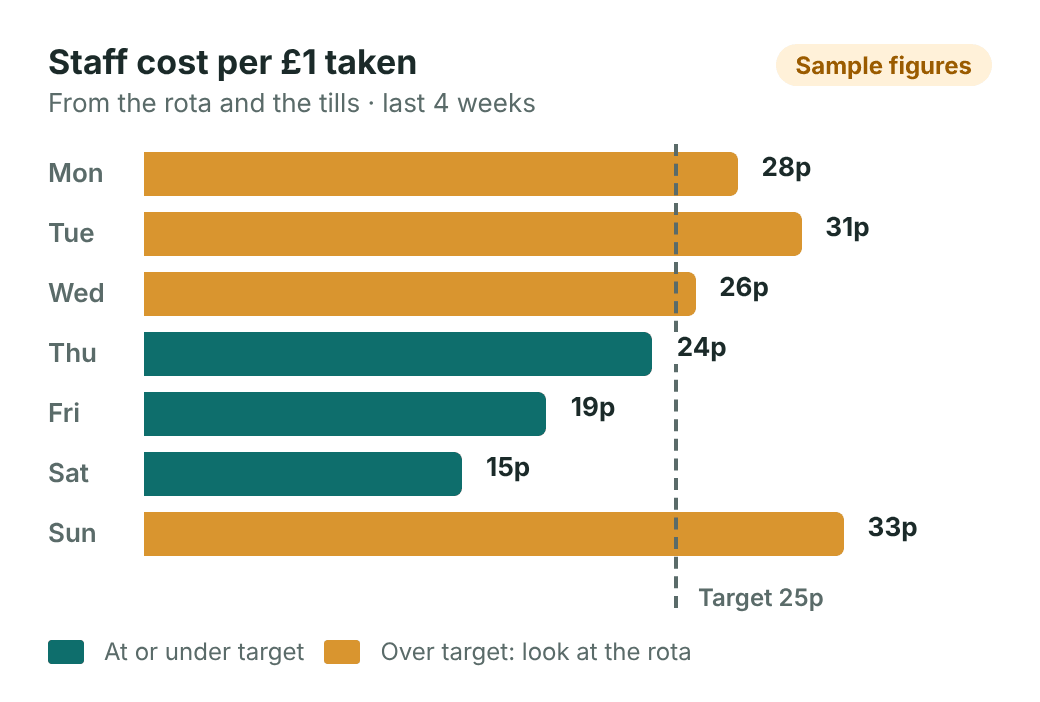
See when each shop is busiest, how quickly the tills serve, everything lost in pounds, and what staff cost for each £1 taken, from your Aubree Rota. Head office also sees which tills and people are worth a look.
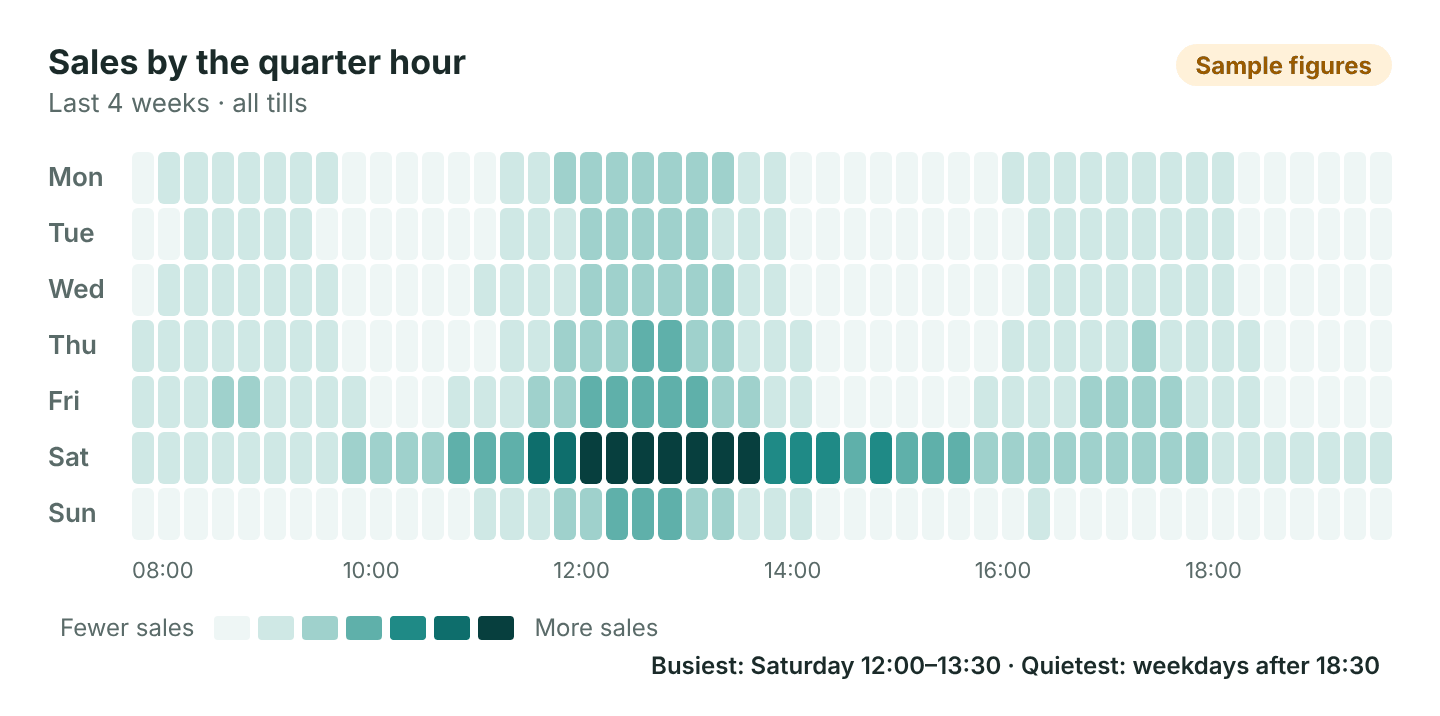
- Busy times by the quarter-hour
- Losses next to last period
- Staff cost per £1 on Enterprise
-
Ready now
AI analysis of Insights
Each week, a plain-English briefing on what changed, why, and the three most valuable things to do, with what each could be worth. Ask Aubree questions like "Why was Tuesday down at Riverside?" and see the figures behind each answer. Use your own AI key, or the Aubree One AI add-on. Never sees your customers.
- Three actions a week, with a £ estimate
- Answers show the figures used
- Own key or Aubree One add-on
-
Ready now
Alerts on your phone
Get a notice on your phone, by email or by text when something at the tills is worth a look, with quiet hours when you don't want to be disturbed.
- Big refunds and discounts
- The drawer opened with no sale
- A cash-up that doesn't match
-
Ready now
Accounting export
Each day's takings as a journal, split into sales, VAT, cash, card, gift cards and tips, ready to import.
- Xero and QuickBooks Online
- A summary for any other accountant
- Choose your own account codes
-
Ready now
VAT return figures
See the figures for your UK VAT return each quarter, from every WooCommerce order. Download them for your accountant or bridging software to file.
- Sales and refunds counted when paid
- Split by tax rate
- A CSV ready for Making Tax Digital software
Enterprise Insights
See where the money is.
Insights put your tills and your rota side by side. Spot the busy quarter hours that need another pair of hands, the quiet ones that don't, and the days when staff cost eats into takings.
- Peak-time heatmap by weekday and 15 minutes
- Time between sales, so you can see how busy each till really is
- Loss shown in pounds, not just in item counts
- Staff cost per £1 taken, straight from the rota
- Till and staff risk patterns for head office
Multi-site and Enterprise
Several shops, stalls or sellers, run from one place.
-
Ready now
Several locations
Add a second shop or a market stall, place each till at a location, and move stock between them. Your website sells from the total.
- Stock at each location
- Move stock in a few taps
- Each till sees its own shelf
-
Ready now
Prices by location
Keep one price online and set a different one at any location. The till at that location charges its own price, and reports show what was charged.
- Set on the product or variation
- Works offline at the till
- Online shop keeps its own price
-
Ready now
Several tills
Name each till, choose who works it, and see takings and cash-ups per till.
- A card reader for each
- Reports for each till
-
Ready now
Many sellers, one till
Built for Dokan marketplaces: each item knows whose it is, so one sale with several makers' items is split correctly.
- Splits and commission worked out
- Reports for each seller
- Sellers can run their own till too
-
Ready now
Head office view
Sales, refunds, stock value and which tills are online, for each location, today, this week and this month.
- Online orders on their own row
- Stock valued at cost
- Spot a till that has gone quiet
-
Ready now
Single sign-on
Staff and managers sign in with your own Google or Microsoft account, so there's one less password to manage.
- Uses your own sign-in app
- Only verified work emails are trusted
- Works for the till's sign-in too
-
Ready now
API keys and webhooks
Give your accounts, data warehouse or head office systems their own key to read sales, refunds, stock and cash-ups, and get told when things change.
- A named key for each system
- Read-only, revoke any time
- No customer names or emails shared
Security and data
Your data stays in your shop, backed up and accounted for.
-
Ready now
Cash-ups and till audit
Cashiers count the drawer without seeing what it should hold, and the audit flags unusual voids, refunds and differences for each till and person.
- Blind counts for cashiers
- Unusual patterns flagged
- Every override recorded
-
Ready now
Till audit download
Download the audit trail for any period: who did what, on which till, and when. Clear out old events after a number of months you choose.
- Refunds, voids, no-sales and price changes
- Safe to open in a spreadsheet
- Keep it as long as you need
-
Ready now
Nightly backups
Your database and uploads are packed up, encrypted if you like, and sent to storage you choose. A failed backup emails you.
- Encrypted with your own passphrase
- The newest few are kept
- Put one back with a few steps
-
Ready now
Your data stays yours
Your sales, customers and stock stay in your WooCommerce shop, not on our servers. We only see your licence and whether your shop is healthy.
- No cut of your sales
- Card payments through your own account
- Leave any time with all your data
-
Ready now
Privacy tools
Customer records from the till show up in WordPress's own personal data export and erase tools, and there's suggested wording for your privacy policy.
- Export a customer's data on request
- Erase it when asked
- Suggested privacy policy text
Set-up and devices
Up and running in minutes, on the devices you have.
-
Ready now
Guided set-up
Shop, market hall, café, salon or something else: the set-up switches on the features that suit you and walks you through each step.
- Sensible settings for your trade
- Run it again any time
-
Ready now
Connect a till with a QR code
Make a set-up code in WordPress and scan it on the new till. No passwords to type.
- Codes expire after a short time
- Each till gets its own access
-
Ready now
Your brand, your way
Put your own name, logo and colour on the till and your receipts, with your VAT number and a friendly footer.
- Light and dark mode
- Branded receipts
-
Ready now
Any currency, any tax
Aubree One uses your WooCommerce currency and tax settings, including tax added at the till.
- VAT or sales tax
- Your shop's own currency
-
Ready now
Android tablets and phones
Install the Android app, or open Aubree One in a browser on a laptop or tablet.
- Works in Chrome, Edge and Safari
- Android app
-
Ready now
iPad and iPhone
Open Aubree One in Safari and add it to the home screen, and it runs full screen like an app, even offline.
- Works in Safari
- Add to Home Screen
- App Store version on the way
-
Ready now
Receipt printer and cash drawer
Thermal receipt printers by USB, Bluetooth or your shop's network, with the cash drawer opening for cash.
- Epson and Star printers
- Drawer opens through the printer
- Every no-sale drawer opening logged
-
Ready now
Customer display
Customers see each item, any savings and the total as you ring it up, then their change.
- A second screen on the same computer
- Or any tablet, by scanning a code
-
Ready now
Scales
Items priced by weight are weighed at the till, and the weight shows on the receipt.
- Price per kg or per lb
- Common shop scales by USB or serial
- Or type the weight in
Ready when you are
Pick a plan and your licence key arrives by email straight away, with a link to set up your account.